
Build polished Gutenberg carousels faster with a growing collection of ready-to-use templates. The Template Library is included with appiapp Carousel Block 3.0 and every available template is free to use and customize.
There are no premium-only templates, locked layouts, subscriptions, or paid upgrades. Templates that were previously presented as premium are now available to everyone.
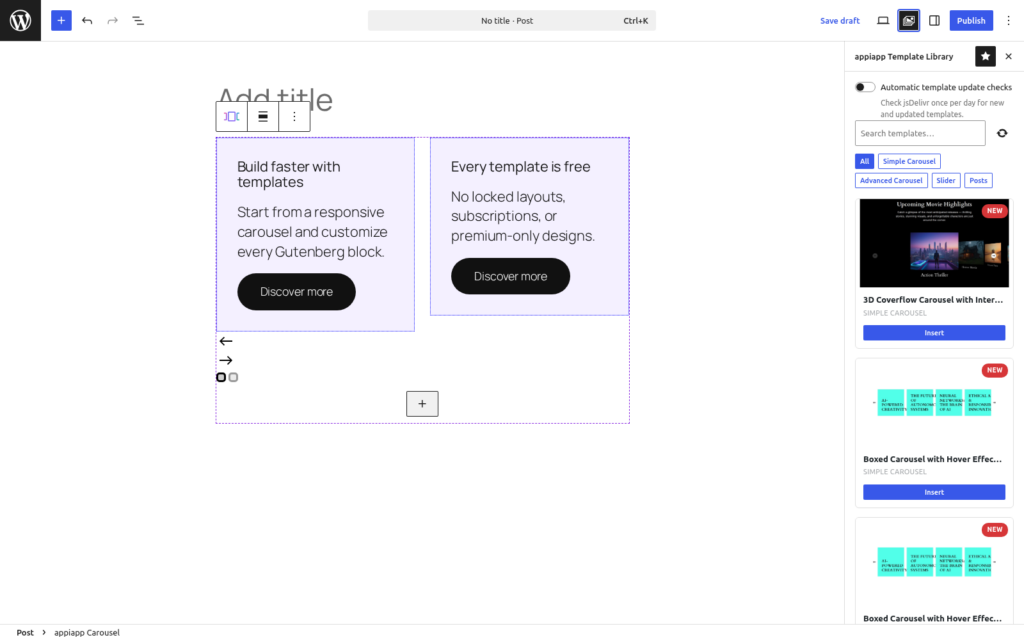
Open the Template Library
You can open the library in two ways.
From a new carousel block
- Add the appiapp Carousel Block in the WordPress block editor.
- Select Choose a template in the carousel placeholder.
- The Template Library opens in the editor sidebar.
- Browse the designs and select Insert.
When you open the library from an empty carousel, the selected template replaces that empty block. This keeps the page clean and avoids leaving an unused carousel behind.
From the WordPress Command Palette
- Open the Command Palette with
Ctrl+Kon Windows or Linux, orCmd+Kon macOS. - Search for appiapp.
- Select Open appiapp Template Library.
When the library is opened from the Command Palette, the selected template is inserted at the current editor position. Existing carousel blocks are not replaced.
Find the right template
Use the search field to filter templates by name or description. Category buttons let you narrow the collection to the type of design you need. Each card includes a preview, template name, category, and an Insert button.
New and updated designs are marked directly in the library, so they are easy to identify.
Insert and customize
Select Insert on any template card. The template is added as native WordPress block markup and remains fully editable.
After insertion, you can:
- replace text, images, buttons, and other inner blocks;
- change the number of visible slides and the spacing at each breakpoint;
- switch between Swiper, Embla, and CSS-only modes;
- customize arrows, pagination, colors, borders, and alignment;
- configure galleries, captions, links, and the lightbox;
- use Query Loop to create dynamic post carousels;
- add custom CSS or JavaScript when advanced control is required.
Templates are starting points, not locked components. You keep full control of the resulting Gutenberg blocks.
Refresh the library
Select the refresh icon next to the search field to request the latest manifest and template collection.
Administrators can also enable Automatic template update checks from the library. This optional setting uses WP-Cron to check jsDelivr once per day for new or updated templates. Automatic checks remain disabled until an administrator explicitly enables them and can be disabled again at any time.
External service and privacy
The Template Library retrieves its manifest, preview images, and template content from the jsDelivr CDN when an authorized user opens or refreshes the library. If automatic checks are enabled, WordPress also contacts jsDelivr once per day through WP-Cron.
The plugin does not intentionally send page content, user account details, or plugin telemetry. As with any web request, the CDN processes standard connection information such as the server IP address. See the jsDelivr privacy policy.
Requirements
- WordPress 6.6 or newer
- PHP 7.4 or newer
- The Icon Block plugin, which is declared as a required dependency
- Permission to edit posts or pages
- An internet connection when retrieving or refreshing remote templates
Frequently asked questions
Are all templates really free?
Yes. Every template currently available in the appiapp Carousel Template Library is included for free. There is no premium tier.
Will inserting a template overwrite my existing carousel?
Only an empty carousel used to open the library can be replaced. If that carousel has already been configured, the library prevents accidental replacement. Opening the library from the Command Palette inserts the template at the current editor position instead.
Can I edit a template after inserting it?
Yes. Templates are made from native Gutenberg blocks and appiapp Carousel blocks. Their content, layout, responsive behavior, navigation, and styling remain editable.
Why do templates need an internet connection?
The collection is delivered from jsDelivr so new and updated templates can be made available without requiring a complete plugin update. Previously inserted templates remain part of your WordPress content.
How do I get new templates?
Open the Template Library and select the refresh icon. If you prefer automatic notifications, an administrator can enable the optional daily update check.