
Product Stickers & Labels for PrestaShop — by appiapp
Turn product images into attention magnets. Add badges, labels, automatic discount stickers and custom images on top of your product photos — on the product page and in every listing — with smart targeting rules and zero impact on your shop’s speed.
Compatible with PrestaShop 1.7.8 → 9.x · Works with classic-based themes and hummingbird out of the box.
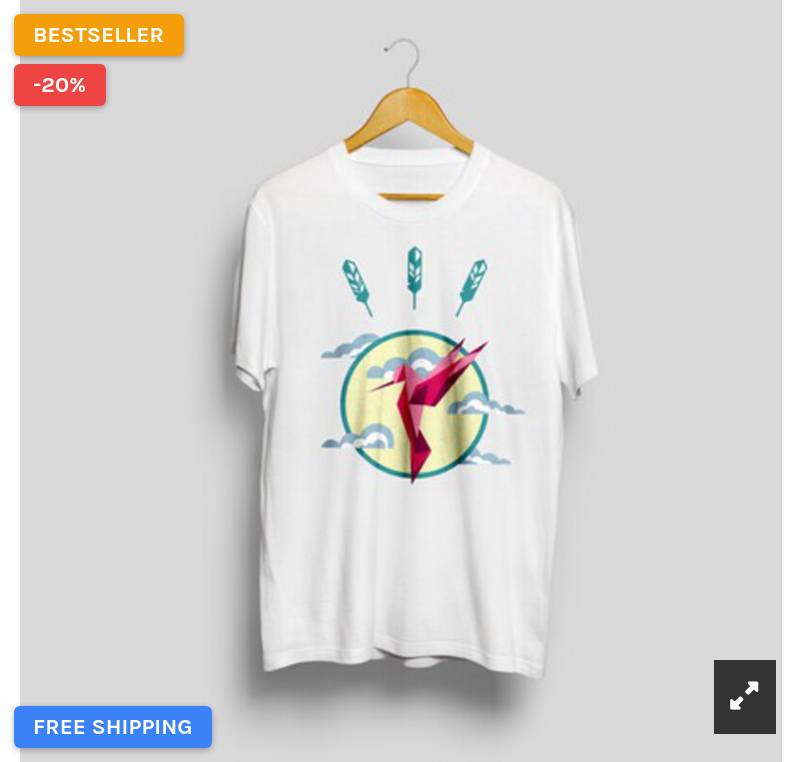
Everything you need to highlight the right products
Say goodbye to manual badge images and theme hacks. With appiapp Product Stickers you define a rule once — the module puts the right sticker on the right products, everywhere.
How it works
Why choose appiapp Product Stickers?
Performance first
Most sticker modules run dozens of queries per page and load jQuery + remote fonts on every visit. This module was engineered the opposite way: 1 query per page, server-side rendering, no JavaScript required.
Choose from three robust carousel engines to match your needs:
Works with your theme
Classic-based themes and PrestaShop 9’s hummingbird work out of the box. Custom theme? A one-line widget snippet and a built-in compatibility mode have you covered — and if switching themes unhooks the module, it repairs itself.
Set-and-forget dynamic rules
Stickers appear and disappear on their own: scheduling windows, stock levels, active discounts, “new product” status — all evaluated live.
FAQ & Troubleshooting
I created a sticker but I don’t see it in the front office
Check the rule — does the product actually match? (e.g. “New products” follows your shop’s “considered new” setting; “On sale” requires an active specific price.)
Check schedule / groups / shops on the sticker: an empty result is most often a filter doing its job.
Caches — the module clears PrestaShop caches on every save, but if you use an external cache (Varnish, CDN full-page cache), purge it.
Stickers disappeared after I changed the theme
Expected PrestaShop behavior (the theme re-assigned the hooks). Open the module’s Configure page once: hooks are restored automatically and a confirmation lists what was repaired.
Stickers appear in the wrong place / not on the image
Enable Theme compatibility mode in the module settings, or add the widget snippet to your theme (see Theme Compatibility).
Stickers don’t update after filtering a category (faceted search)
Faceted filtering replaces the product list via AJAX. Enable Theme compatibility mode: its small script re-anchors stickers after every AJAX update.
My sticker covers the theme’s “-20% / New” flags
Both live in the same corner. Three options, pick one:
hide the native flags from the module settings.
give your sticker the “Stacked with the theme flags” position (it will queue below them),
move it with Offset X/Y,
Two of my stickers overlap
Within the same position this cannot happen (they stack automatically). If you see it, the two stickers are in different positions whose areas collide (e.g. a tall top-left stack reaching center-left), or an Offset pushed one over the other. Adjust positions/offsets.
The homepage still shows an old sticker I deleted
Homepage blocks like “Featured products” are cached by their own modules. Saving any sticker clears that cache; if you edited data directly in the database, clear PrestaShop’s cache manually (Advanced Parameters → Performance).
Does the module slow my shop down?
No — that’s its main design goal. It runs one database query per page (regardless of the number of products displayed), renders server-side, loads ~1 KB of CSS only on catalog pages and no JavaScript unless you enable compatibility mode. Automated tests measure this on every release.
Which PrestaShop versions are supported?
1.7.8 up to 9.x, single codebase. Every release is validated by an automated end-to-end suite on PrestaShop 1.7.8, 8.2 and 9.0 (classic + hummingbird).
Is SVG supported for image stickers?
No, by deliberate choice: SVG can embed scripts and stickers render on every product page. Use PNG or WebP for vector-crisp results (export at 2× size).
Ready to make your products stand out?
Download the module and create your first sticker in under a minute.
Tested automatically on PrestaShop 1.7.8, 8.2 and 9.0 (classic and hummingbird themes) with a 10-scenario end-to-end suite before every release.